
iPhone & Android · free to start

Fanripper on your phone.

On a phone, use the Fanripper app. It opens in the free Expo Go app, saves straight to your phone and updates itself. No extension, nothing to unzip.

On a computer? Install the browser extension

Install · about one minute

Install Fanripper in one minute.

For Chrome, Brave and Edge on your computer. Download one file, unzip it, and load it on your browser’s extensions page. You only do this once.

  • Free to install
  • Never asks for your site password
  • 0 / 63 on VirusTotal
Also on iPhone & AndroidThe Fanripper app saves straight to your phone
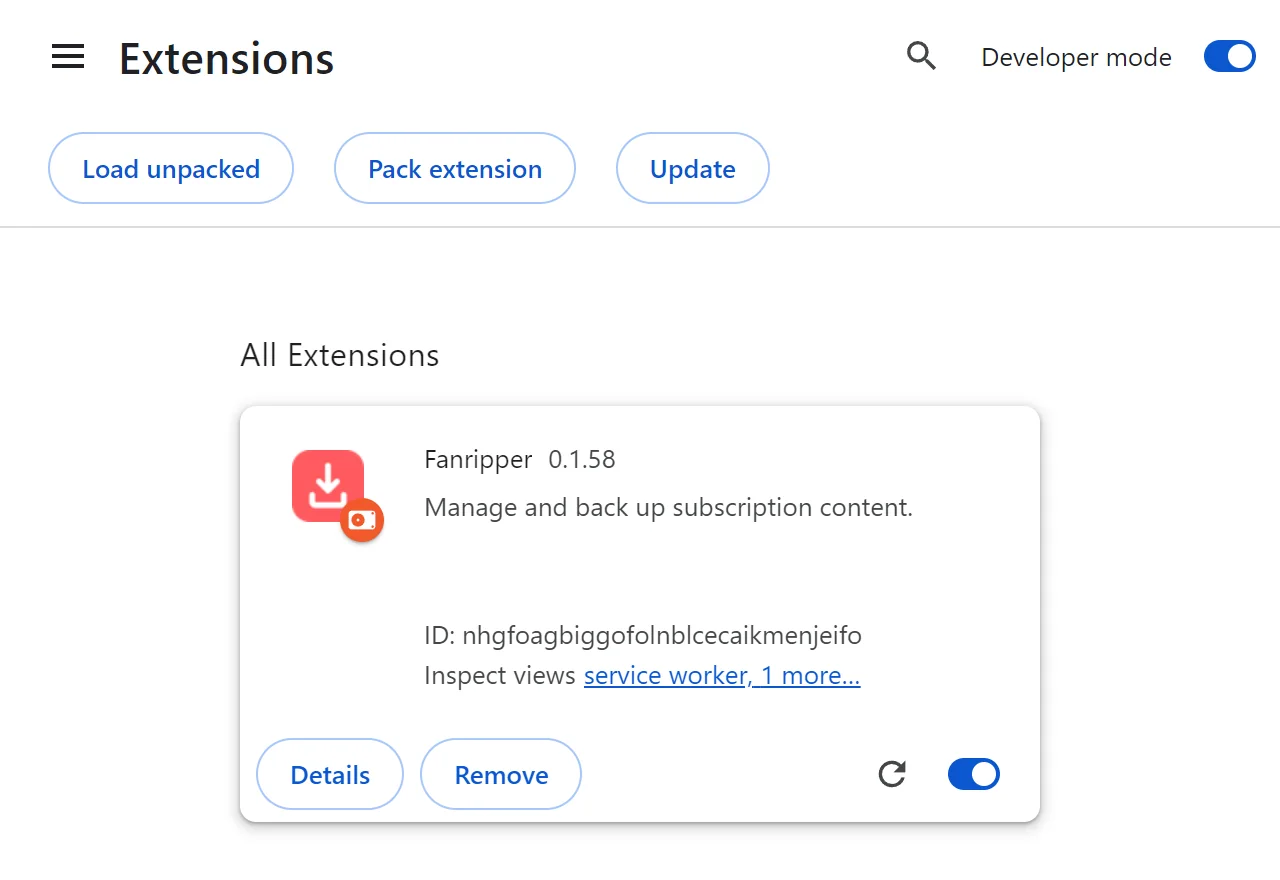
Chrome’s extensions page: Developer mode is switched on at the top right, the Load unpacked button is at the top left, and Fanripper is loaded and switched on.
  • 3Developer mode on
  • 4Load unpacked
  • ✓Fanripper is on
Watch it

The whole setup, in 45 seconds.

Download, unzip, load, pin, sign in — then click Download on any post and pick a quality. Silent, with captions.

Step 1 · Download the file — Click Download Fanripper (.zip)

Chrome on Windows shown. Brave and Edge are the same steps — only the extensions address changes.
On your phone

iPhone or Android, in 30 seconds.

Get Expo Go, open Fanripper, sign in with the code we email you — then tap Save on a post and pick a quality. Silent, with captions.

Step 1 · Get Expo Go — It’s free on the App Store and Google Play

The same app on both. It runs inside Expo Go — open it from fanripper.com/app.
Install on your computer

Four steps. One minute.

Pick your browser and follow along. The words in bold are exactly what you click.

Your browser
  1. Download the file

    Click Download Fanripper (.zip) and save it anywhere you’ll find it.

    Download Fanripper (.zip)
  2. Unzip it

    Windows: right-click the file → Extract All… → Extract Mac: double-click the file.

    You get a fanripper folder. Keep it — Fanripper runs from it.

  3. Open your extensions page

    Paste this into the address bar and press Enter:

    chrome://extensions

    Then switch on Developer mode (top-right corner).

  4. Load it

    Click Load unpacked (top-left) and pick the folder from step 2 — the one with manifest.json inside.

    Fanripper shows up in the list, switched on.

That’s it — you’re set up.

Open OnlyFans, Fansly, JustForFans, privacy.com.br or Fanfix. A Download button sits on every post — click it and pick a quality. Tip: pin Fanripper from the puzzle-piece menu so it’s one click away.

Updating to a new version

Fanripper tells you when a new version is out. Updating keeps your settings and sign-in.

  1. Download the new .zip from this page.
  2. Unzip it and copy everything inside into your existing fanripper folder. Choose Replace when asked.
  3. On chrome://extensions, click Fanripper’s ↻ reload button.

Use reload, not Remove. Removing Fanripper deletes its data in this browser.

Safe to install

Checked by 63 security engines.

0 / 63

security vendors flag version 0.1.60 on VirusTotal.
See the report

  • Never asks for your OnlyFans, Fansly or JustForFans password.
  • Downloads are processed on your own device.
  • Prefer GitHub? Every release is on our releases page.
If something’s off

Quick fixes.

I can’t see “Load unpacked”

Switch on Developer mode first — the button appears right after.

It says “Manifest file is missing or unreadable”

You picked the wrong folder. Open the folders until you see manifest.json, and pick the folder it sits in.

There’s no Download button on the site

Refresh the page, and make sure you’re signed in on the site. If it’s still missing, turn off any other downloader extensions, then refresh again.

Why isn’t it in the Chrome Web Store?

Stores remove extensions that work with subscription-content sites, so Fanripper installs once in Developer mode. It doesn’t update itself: when a new version is out, Fanripper tells you, and updating takes a minute.

Stuck? Ask us.

Telegram is the fastest way to reach us — and where new versions are announced first.